
BREEDING
Breeding is one of the more complex features of the game. This guide is divided into sections that follow the screen and menu order as it is presented in the Sim.
Clicking on any of the main headings throughout the guide will return you here to the Contents Layout. Clicking on the links below will enable you to navigate the sections.
CONTENTS LAYOUT
OVERVIEW
Main Breeding Screen
First let's take an overview of the main Breeding Screen [fig.1]. Upon clicking "Breeding" on Derbyfever's top toolbar, the left side of the screen will update to show a menu selection to access the various breeding screens, as shown below.
Fig.1
The left side of the screen shows three main menu sections:
Breeding:
Mares:
My Stables Login:
All horses that are bred require a pedigree that contains a sire, a dam sire (referred as the DS) and a dam-dam sire (referred as the DDS). While the game itself proceeds in real time, you don't have to wait years for a horse you have bred to be able to race; the game will produce a race-ready horse as either a two- or three-year old, dependent on your selections.
There are three methods by which a horse can be bred and these will be covered individually in depth later:
Shares in sires, DS and DDS are available and can be acquired by using either credits or breeding points (BPs). Shares give players the right to use the acquired sire, DS or DDS from the date the share is acquired up to December 30th of the following year. Thus a share obtained for a sire on April 1st 2014 is good to use until December 30th 2015. After that date, the share expires and is non-refundable.
The figure below [fig.2] illustrates how this screen will appear when you first access it, using the default settings. The top part of the screen allows players to perform searches of the database for particular information.
The search options are:
After clicking "Update List", a listing appears based on the search criteria the player has selected.

Fig.2
The column headings:
Clicking on a sire's name will display a popup Individual Sire Page such as that shown below [fig.3]. In this example, Montjeu was chosen, and information showing the horses bloodline, current costs to acquire a share, and historical information on past breedings are displayed. Detailed information about this page is covered in the Individual Sire Page and Acquiring Shares sections of this guide.
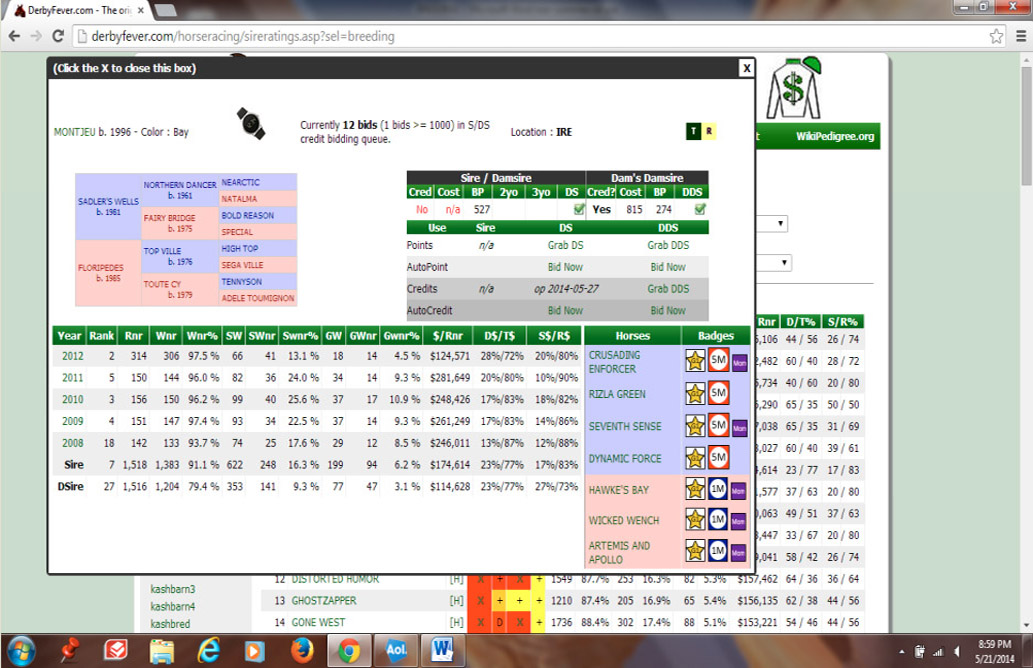
Fig.3
Clicking on the [H] to the right of a sire's name [fig.2] will produce a listing of past horses bred by the sire concerned, in descending order of achievement. Shown below [fig.4] is the listing for Kingmambo at the time of writing. This listing can help players identify dam sires that have been successful with a particular sire in the past. Clicking on the horses listed will show their lifetime race record within the game.

Fig.4–Screen displayed by clicking [H]
The 'Find Sires' screen [fig.5] appears blank when first accessed. It will produce a wealth of data once a player has chosen criteria to filter by.

Fig.5
The selections to choose from are:
To illustrate this selection feature, a search was made to find sires that could be used to produce a 2-year old horse using either breeding points or credits (Pnts/Crd). The 'Sire Search' box was left blank and 'All Locations' was selected. The listing below [fig.6] was produced, in alphabetical order by the name of the sire.
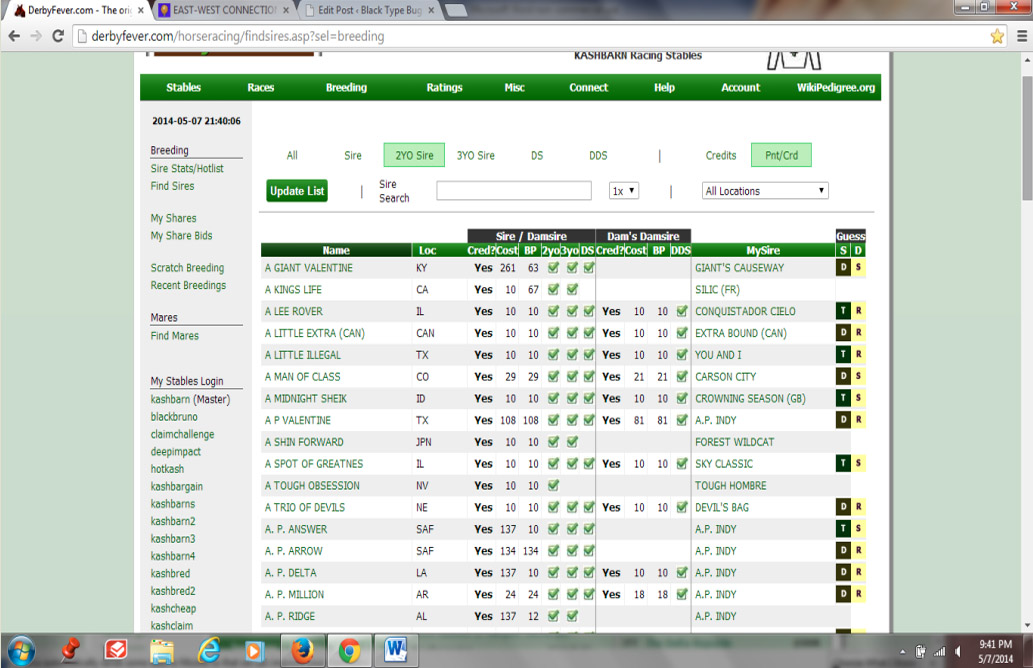
Fig.6
Several columns appear and most are sortable.
The following is a description of each column:
To sort by a particular column, where applicable, simply highlight the column heading you want to sort by, and left-click. For example, clicking the 'Name' column will sort alphabetically (A to Z). Clicking it a second time will reverse the order (Z to A).
Clicking on a horse name will bring up its Individual Sire Page such as that shown below [fig.7]. In this example, A Man of Class has been chosen and information showing the horse's bloodline, costs to acquire a share and historical information on past breedings are displayed. Detailed information about this page is covered in the Individual Sire Page and Acquiring Shares sections of this guide.

Fig.7
This screen [fig.8] shows the shares a player owns for breeding, and comprises sires, dam sires and dam-dam sires.
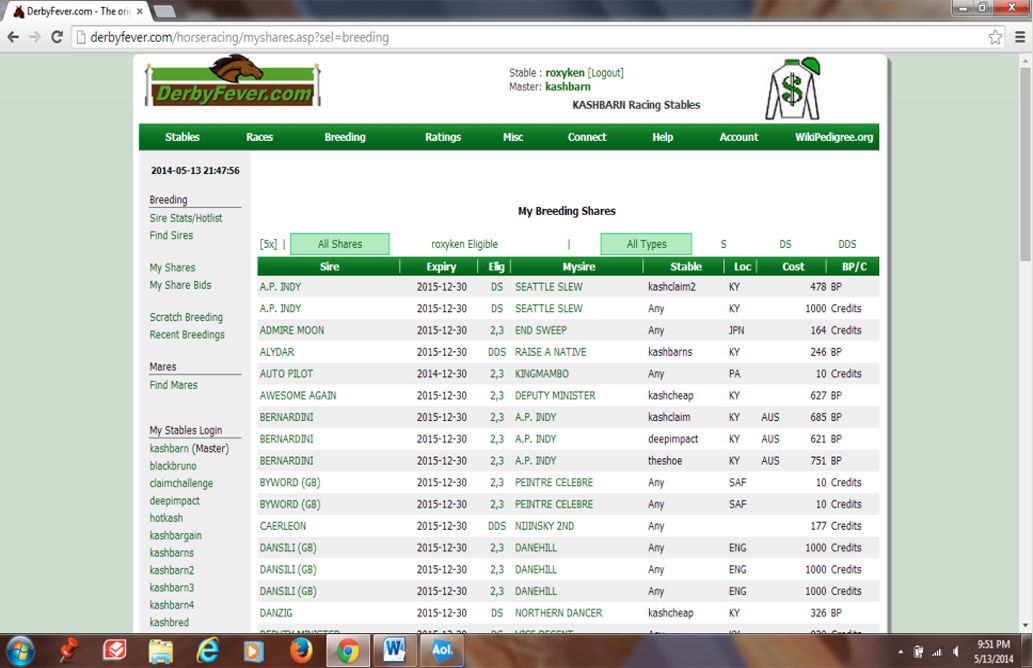
Fig.8
Above the column headings are the following selections:
The column headings are:
Rather than purchase sire/DS/DDS shares outright at the current price, a player may instead submit 'bids'. The 'My Share Bids' screen monitors such share bids.
Bids may be placed, via a sire's popup Individual Sire Page, for shares in the role of each of sire, DS and DDS, using either credits or BPs. Prices for both the sire/DS and the DDS roles decrease over time for both purchase methods, to a potential low of 10 in each case. If a particular share is purchased by any player, the price for that role by that payment method will jump again. If a price decreases to meet a player's preset bid, a share will be automatically purchased for the player (funds permitting).
The mechanics of placing bids are covered by examples in the Acquiring Shares section of this guide, but the screen below [fig.9] shows the essential details.

Fig.9
The list can be filtered on each of the heading sections "All | Active | Inactive", "All Types | S | DS | DDS", "All | Credits | BPs", so as to filter the particular share bids displayed.
The column headings below the heading sections are:
Maintaining a personal Sire List
The list also allows a player to maintain a personal shortlist of sires they are interested in using, by means of placing a bid on such sires and then deactivating it.Sire Cards were introduced whilst this manual was being produced, and their link is not shown in the accompanying screenshots. All you need to know about this quick and easy way of getting some horses bred is described under the Game Cards link on the left here in the Help section.
This screen is described later, in the Scratch Breeding A Horse section.
This screen [fig.10] shows basic information on horses that have been submitted for breeding within the last four weeks. At the foot of each horse section is shown the status of the breeding, such as 'Horse successfully created'.
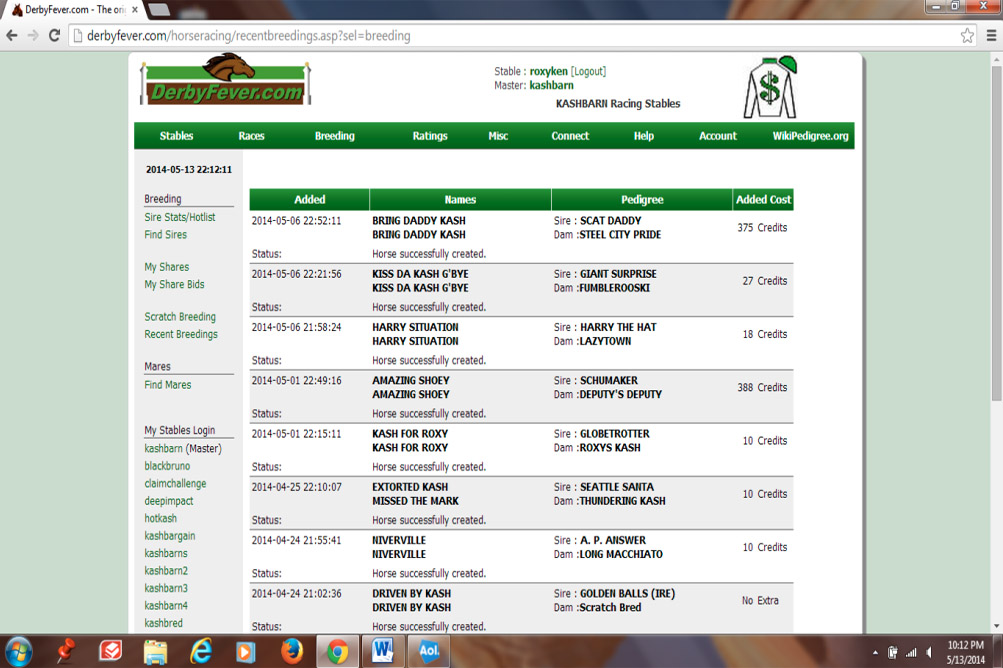
Fig.10
The 'Find Mares' screen [fig.11] gives players the opportunity to find retired mares (aged 4 years and over) that have raced in the game, and to select them to breed with a sire. This is a search screen that provides results based on player selections.

Fig.11
Selection boxes:
Mare's Sire– If not left blank, this filters the output to produce a listing of mares that were created in the game using a specific sire. Typing in Storm Cat will select a list of mares that were created using that sire. Shortening the search name to Storm will create a longer listing showing any mare created using a sire with Storm anywhere in its name, such as All Storm, Stormy Boy, etc.
Status– Provides two further dropdown search options that work in conjunction with the "Mare's Sire" box:
He-mares
The lists produced will include any eligible 'he-mares'. These are male horses aged 4 years and over that have been retired within the last 3 months, and are then available to the player retiring the horse be used as a one-time mare. The cost for this is based on the horse's best racing performance. The better the winning performance, the lower the cost:
200 – Stakes or Graded Stakes win
400 – Allowance win
600 – Win at any other level
1000 – Non-winner
Managing the 'Find Mares' list
In situations where a player has perhaps a number of retired mares they don't currently want to see in the list (possibly because they would never want to use them for breeding), it is possible to set those particular mares so that they do not appear in the listings. Refer to Appendix B for details.
INDIVIDUAL SIRE PAGE (Sire data & Share acquisition)
Having used either the 'Sire Stats / Hotlist' or 'Find Sires' menu options to bring up a list of sires of potential interest, players can then click on any sire name, which will bring up an Individual Sire Page similar to that below [fig.12]. This page can also be accessed by clicking on a sire name on the 'My Share Bids' screen.

Fig.12
Awesome Again, currently a sire in higher demand with players, is shown. Next to his name is a watch that can be used to put on a players 'watch list' (although, at the time of writing, this feature is not yet implemented). To the right of that is shown the number of credit bids currently placed on the horse for use as either sire or dam sire. In this case there are 39 bids, of which 26 are for 1000 or more credits. To the right of this is shown the geographical location where breeding will take place if the horse is used as a sire, Kentucky (KY) in this instance. Dual locations show for sires that 'shuttle'. At the far top right are the letters D and R, which is the 'Guess S|D' indication of possible progeny's aptitude, as listed on the sire search screens.
Under the sire's name is its 3-generation pedigree, which will carry over to its progeny.
To the right is where the acquisition of a sire, dam sire or dam-dam sire occurs. The headings combine the cost as Sire or Damsire to the left, with the cost as Dam's Damsire on the right.
The headings under these column titles are:
Different prices and availabilities are shown in the righthand section, for using the horse as a dam's damsire
In our example Awesome Again, a share is not currently available for Sire/Damsire purchase with credits, however it can be acquired for 1000 BPs. As a Dam's Damsire, a share is also not available for credits but can be obtained for 279 BPs.
The Use column in the lower area shows the following row headings: clicking in any of the cells in the appropriate row will initiate the acquisition of a share, or bid for a share, in the horse displayed.In our example Awesome Again, Sire, DS and DDS shares can be acquired for the current cost shown in BPs by clicking 'Grab' and, additionally, bids may be placed for shares using BPs. Using credits, the 'Grab' feature is currently unavailable and so an opening date is shown. Note, though, that there are 26 bids for 1000 or more credits already placed, and this will actually prevent the horse from becoming available as a 'Grab' using credits. On the 'AutoCredit' row, the player has placed a bid of 1000 credits to acquire a sire share. No bids are currently active in the 'DS' or 'DDS' columns.
[ See the earlier section My Share Bids for more information regarding Auction shares, and the following section Acquiring Shares for examples of the auction process.]
Below the pedigree and acquisition sections, the lower part of this Individual Sire Page shows, on the left, statistical data regarding the horses that have been bred by the sire and, on the right, shows his top seven most successful progeny. Clicking on any of the horse names there will bring up their past racing history.
The statistical data on the left shows the most recent five years, as well as the lifetime total both as a sire and as a damsire (Dsire).
The following is a description of the headings for this area:
Another feature within the statistical breeding history is that a player can click on any of the five years of breeding history. This will bring up a listing of all horses that were bred that year using the horse as sire. To show this, Awesome Again will be used, selecting 2011 progeny [fig.13]:

Fig.13
A screen opens [fig.14] that lists all the horses that were bred with the chosen sire, listed in order of performance (weighted by Stake/Grade level wins and earnings).
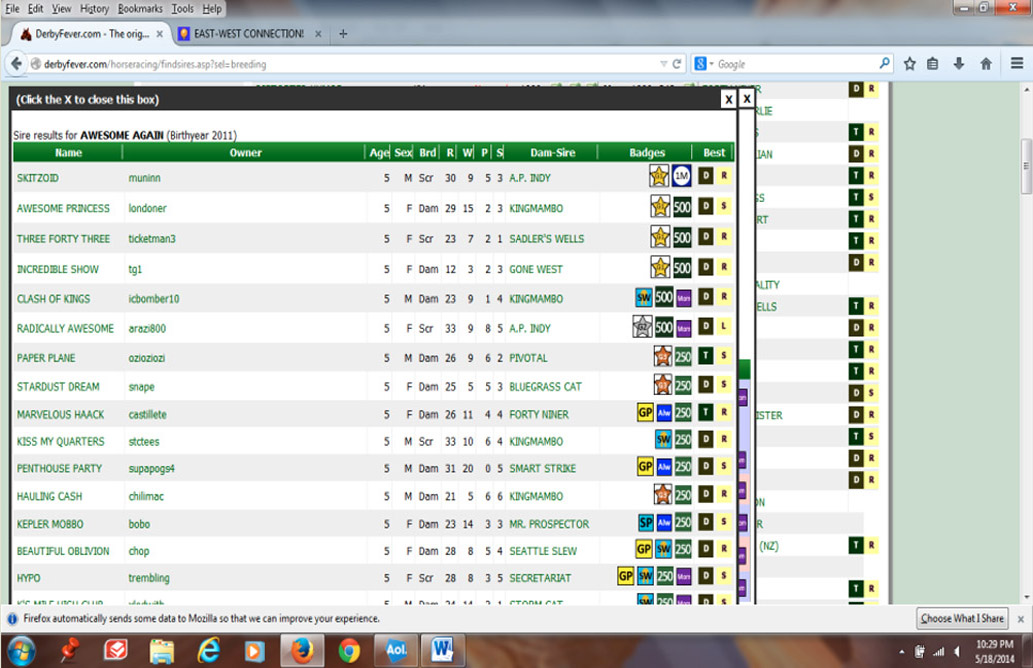
Fig.14
There are three methods by which a breeding may occur. In each method, there is a minimum requirement of owning a sire share.
With an understanding of the screens, as described in the previous sections, we will show examples of acquiring shares whilst performing a walk-through of each of the three breeding methods.
Breeding shares are acquired via a sire's Individual Sire Page and are sold via a 'Dutch' auction. Players can grab a share at any time at the current offered price, or a player may place a bid with hopes of getting the horse at a cheaper price. Shares are offered for both credits and BPs in separate auctions. Share prices will drop over time to a minimum amount of 10 credits or BPs. Once a share has been sold, the auction starts over, and the price for that payment method will reset based on recent demand for shares in that horse. The maximum price that shares will reset to is 1000.
NOTE: Instances will occur where credit shares will not immediately become available after a share has been sold. In these cases, an opening date will appear which is indicative of the day the share will become available. If there are any bids placed of 1000 or more prior to this date, the share will not be available on the open market.
If only one player bids 1000 or more, they will obtain the share. If there are two or more players with bids of 1000 or more this will trigger an alternating event to occur. One week, the highest bidder will be awarded the share for the amount of the second highest bid + 1 credit. A player with a high bid of 1100 where the second highest bid is 1075 will pay 1076. The second week, a random selection by the computer will be held between all bidders of 1000 or more and the winner will be awarded the share at a cost of 1000. The system does not display which of the two weeks it is on in this cycle. Players with bids below 1000 may need to adjust their bid accordingly if they desire to obtain a share.
The following is an example of how shares are acquired. Shares can be acquired in any order, but in this scratch breeding illustration a sire share will be acquired first, then a DS share and finally a DDS share. The means of each share purchase could of course vary, depending on the player's situation at the time.
To begin the scratch breed process a sire share will be acquired. The Individual Sire Page for Storm Catcher is shown below [fig.15] and credits will be used to acquire a sire share. Since the current price is at the minimum of 10, the 'Grab Sire' will be used to make the acquisition at the current price.

Fig.15
A confirmation box will appear that gives players a chance to cancel the share purchase [fig.16]. Check the box to confirm you understand you are using credits to purchase the share (BPs will not be used). Read the notes in the lower section of the confirmation box for specific details.

Fig.16
After accepting the transaction a confirmation screen will appear indicating that you have acquired the share and that it has been added to the stable queue listing, which is accessed via the 'My Shares' menu option.
Next a dam sire (DS) needs to be obtained. Academic will be used as the DS. Note that this horse cannot be used as a sire. The game mimics real life, and when a sire is no longer standing in real life, it will soon become unavailable as a sire within the game. With Academic, BPs will be used. The cost is the minimum of 10 and 'Grab DS' on the 'Points' row will be used [fig.17].

Fig.17
Again, a confirmation box will appear [fig.18] and, if satisfied with the cost of the purchase using BPs, click confirm. Otherwise, simply close the box by clicking the X in the top right corner. Read the notes in the lower section of the confirmation box for specific details.

Fig.18
My Friend Max is being used as the dam-dam sire (DDS). The current cost for the DDS share is 21. A bid of 19 credits is being placed for the share. Upon clicking on 'Bid Now' in the 'DDS' column on the 'AutoCredit' row, a popup screen appears where the amount of the desired bid can be entered and a box checked to acknowledge the use of credits [fig.19].

Fig.19
After placing the bid, the screen will be updated and show the bid in place [fig.20]:

Fig.20
The share will be acquired if the price over time drops to 19 and no other bids are made or no other players 'grab' the share at the current market price. The bid will appear on the 'My Share Bids' screen and will remain there until the player chooses to remove the bid.
In our case, the bid on My Friend Max was eventually won at a price of 19 credits. With all shares (sire, DS, DDS) now obtained it is time to breed a horse.
Upon entering the 'My Shares' screen, all share holdings will be listed. In the example, Academic was acquired as the DS. To activate the share, click on the DS in the 'Elig' column for Academic [fig.21]. This will move the share to the top of the screen and it will appear highlighted in blue, indicating that the share has been activated for breeding. Should a player decide on a different share, simply click on the new share and it will be moved to the top replacing the previous selection. To complete the process, the 'Elig' column was clicked on the 2,3 for the sire share, Storm Catcher, and on the DDS for the share My Friend Max.
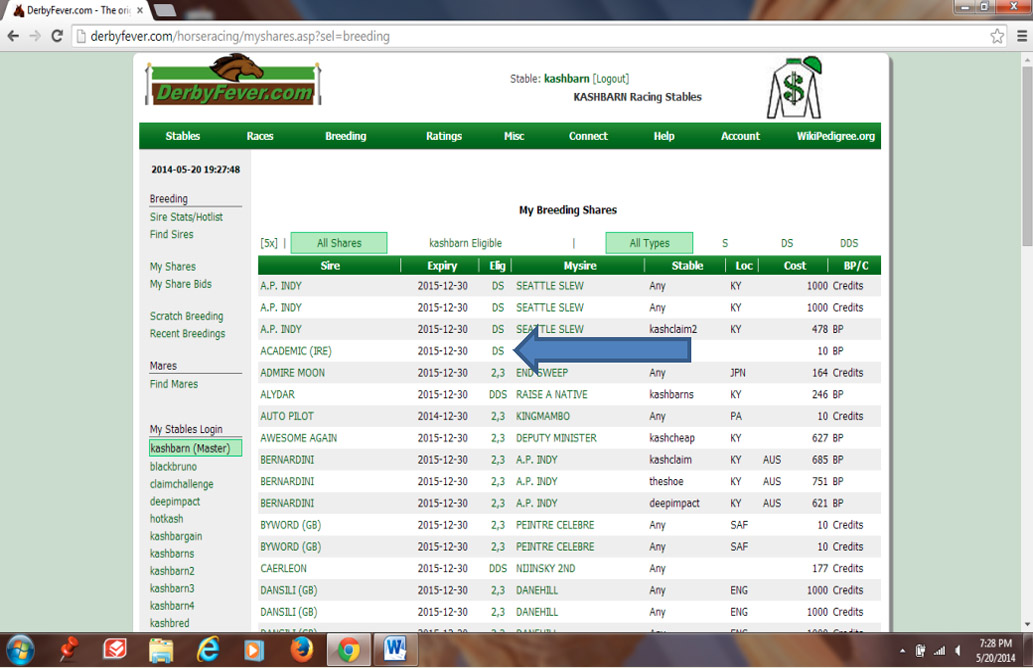
Fig.21
The three shares now appear highlighted at the top of the screen listing [fig.22].

Fig.22
Under the 'Stable' column you will see that the sire and DDS show Any, which means that any stable in the stablegroup can breed using those shares, as they were bought with credits. The Academic share on the other hand, which was acquired using BPs from the stable kashbarn, shows that stablename, which indicates that only the stable kashbarn can breed directly using that particular share. However, such shares can often be transferred to another stable in the stablegroup. This is covered in the next section Transferring Shares.
By clicking on the [5x] towards the top left [red arrow, fig.22], players can review the new horse's hypothetical pedigree and determine whether there is any significant inbreeding between the selected sire and dam lines. This will display a screen similar to the one shown below [fig.23]. Any inbreeding in the lineage is highlighted using a variety of colors. In our example, Northern Dancer appears 4 generations back in the sire line (Storm Catcher) and 5 generations back in the dam line (via the DDS My Friend Max), and is highlighted by the 4Sx5D markers. This particular inbreeding in our example is reasonably insignificant. As previously noted, players can return to the 'My Shares' screen and change the selected sire, DS and DDS if not happy with the results displayed.
The horse's 'Hypothetical Horse Pedigree' screen also shows at the top left the new horse's 'Dosage figures' (DI, CD etc.) For more information regarding Dosage, consult the chef-de-race.com website and the Wikipedia article.

Fig.23
After all the shares have been selected, it is time to complete the Scratch Breeding. On the left side of the screen, select 'Scratch Breeding'. Note that the sire, DS and DDS shares need to have been chosen first, otherwise a message will appear instructing that shares need to be selected before proceeding. The following screen will be displayed [fig.24].

Fig.24
An overview of this screen:
Note: Unless paying for a specific sex, names for both sexes need to be given. Names must be 18 characters or less and the same name can be offered for both sexes. A name cannot be one that has already been used in the game, or that of a real-world sire. Numbers and characters cannot be used other than the apostrophe and the period. The screen will flag any such 'illegal' names once "Breed Horse" is clicked.
Appropriate names: When naming horses, please use common sense and remember the game is played by all ages and backgrounds. Any name considered inappropriate or offensive will be changed by the Administrator and may result in the suspension of breeding and message board & chat privileges for the person concerned.
In our example, two names were selected: Aced The Test for a male and Friendly Academic for a female (not shown in the example). After naming the horses and clicking on "Breed Horse", a popup screen appears confirming that the breeding has been successful [fig.25].

Fig.25
It may take a few minutes for the breeding to be completed. When this has been accomplished, the newly bred horse will appear in the stable listing [fig.26]. In our example, a 2-year old filly named Friendly Academic was successfully bred.
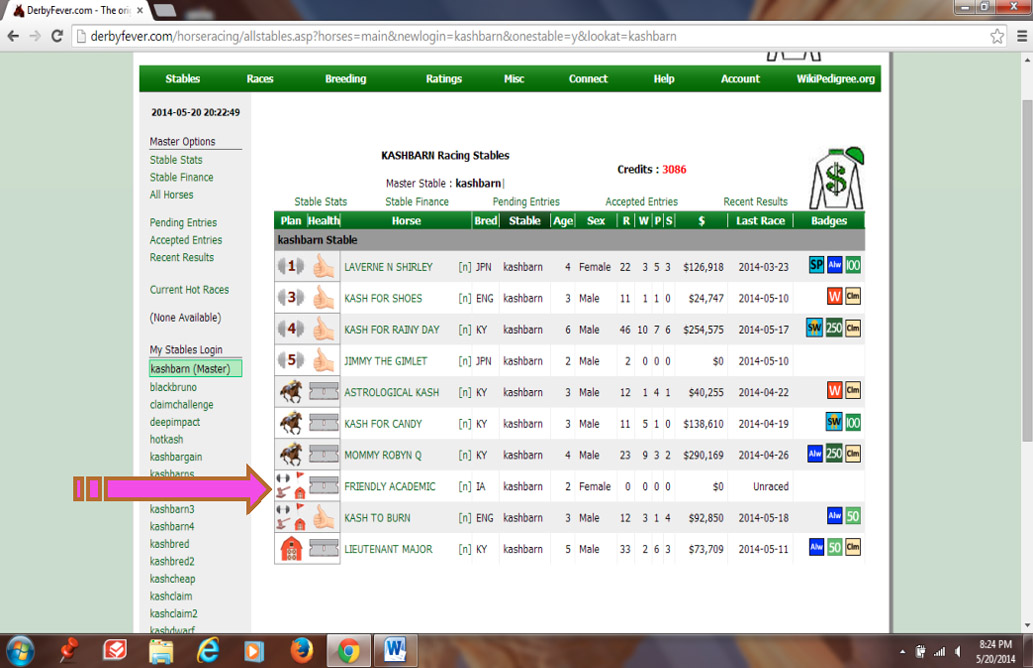
Fig.26
In the previous example, the DS had been acquired using BPs from the kashbarn stable, and was used together with a sire and a DDS that had been acquired using credits. Shares acquired using credits can be used by any of the stables in a stablegroup, but shares acquired using BPs must either be used by the stablename that acquired it or must be transferred to the stablename that wishes to use it, for which an inter-stable exchange of the appropriate amount of BPs must be made. If a stablename has insufficient BPs in its account, the share cannot be transferred. In such situations the 'My Shares' screen will indicate which shares are eligible for transfer, and is used to make the transfer.
In the example here [fig.27], stable kashbarn4 has been selected to breed into by first clicking on its name in the "My Stables Login" list on the left. The kashbarn4 stablename then appears at the very top of the page and also in the 'stablename Eligible' column heading. Clicking on this column heading has listed all the shares kashbarn4 can use.

Fig.27
DS Deputy Minister and DDS Vice Regent have been selected for breeding with, and so are showing highlighted. Both have both been acquired using credits and so show Any under the 'Stable' column. Scrolling down the screen [fig.28], we come to the gray line below which are listed all the sire shares which have been purchased using BPs by other stables in the group and which are eligible for transferring into the kashbarn4 stable.

Fig.28
Here, Awesome Again has already been selected as sire (by clicking on the 2,3 in the 'Elig' column) and so the row is highlighted in blue. The instruction in the gray line says to "... click current stable to transfer." Clicking on the stablename deepimpact (as indicated by the yellow arrow) will now transfer the share to stable kashbarn4 and make the inter-stable exchange of BPs. The share will now appear in the top section of the list [fig.29].

Fig.29
Players who have owned a mare at any time during its racing career may potentially use it to breed with a sire. The 'Find Mares' menu will list such mares – consult Appendix B for details of eligibility.
There is a cost in using a mare, which is dependent both upon the price paid to acquire the share in the sire that is being used, and also on the payment method that was used (credits or BPs).
Illustration breedings using a player-owned mare both with a Credit Sire Share and with a Breeding Point Sire Share are shown in the following sections:
USING A PLAYER-OWNED MARE with a CREDIT SIRE SHARE
Before breeding to a mare, a sire share must be acquired. The earlier sections Acquiring Shares and Scratch Breeding provide details on this aspect.
The first step is to select the desired sire. Using the 'My Shares' screen, a listing of all available acquired shares will appear. The screen below [fig.30] has been sorted by 'All Shares' and filtered by Sires 'S'.
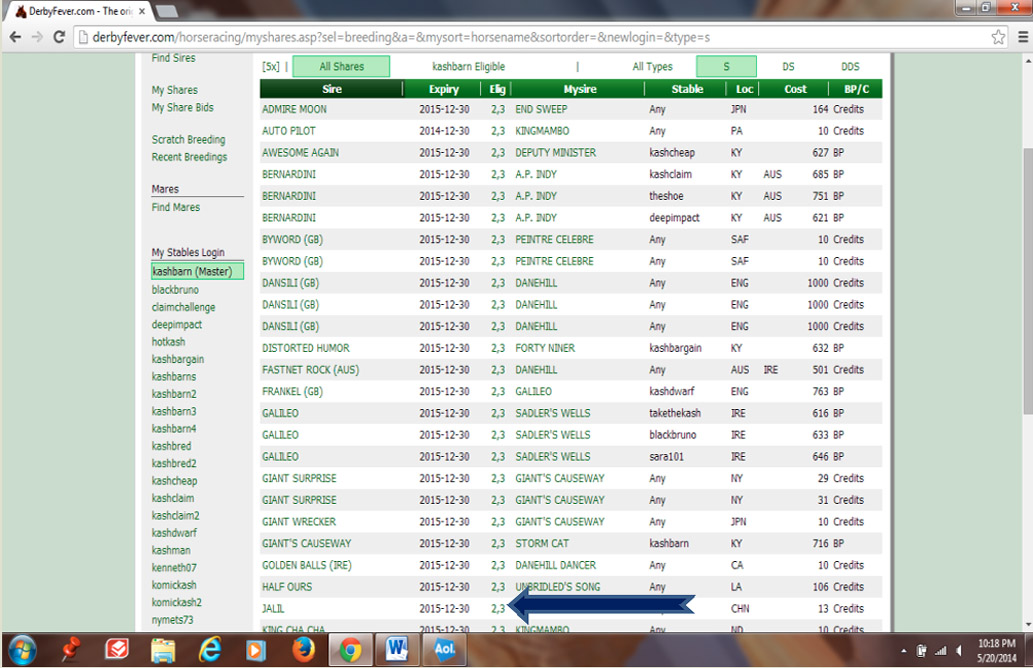
Fig.30
Jalil will be used as the sire here. To select the sire share, click on the numbers that appear under the 'Elig' column associated with the sire share. The share will move to the top of the list and become highlighted in blue (not shown). Note that our sire share is listed as having been obtained for 13 credits.
Next, access the 'Find Mares' menu (see the earlier Find Mares section for more details). Keeping the default "Status" selections set to 'My Mares' and 'Right Now', and with the "Mare's Sire" box left blank, a screen such as that shown below [fig.31] will appear, listing all currently available player-owned mares.

Fig.31
The screen headings show:
Back to our example where the desired mare Never For Love will be used. To select the mare, click on 'Mine' adjacent to the horse name under the 'Use' column.
As previously noted, there is a cost to using a mare. When the sire share has been purchased using credits, the cost for the mare is numerically equal to the acquisition cost of the sire share, but may be paid using either points (BPs) or credits. In our example, as displayed on the breeding screen below [fig.32] — see the previous section Scratch Breeding for more details — the cost of breeding with the mare in this instance is 13, which equals the cost of the sire share Jalil. This is being met with credits (selected via the "Breeding Type" option) and needs to be confirmed. The male name and female name are shown inserted, and the total number of credits that will remain with the player and points (BPs) that will remain in the stable after the breeding is completed are shown at the foot of the screen.
Alternatively, as the Jalil sire share was purchased using credits, the cost of using Never For Love as mare could equally have been met by using 13 BPs.

Fig.32
After clicking on "Breed Horse", a popup screen appears confirming that the breeding has been successful [fig.33].

Fig.33
It may take a few minutes for the breeding to be completed. When this has been accomplished, the newly bred horse will appear in the stable listing [fig.34]. In the example, a 2-year old female named Can't Believe It was successfully bred.

Fig.34
USING A PLAYER-OWNED MARE with a BREEDING POINT SIRE SHARE
In the game, breeding points (BPs) have a greater value than credits. When breeding with a mare, players have the option of paying with either credits or BPs. When using a sire share that was acquired using breeding points, there is a higher cost to use the mare if the player opts to complete the breeding with credits.
To illustrate, Distorted Humor has first been selected as the player's choice of sire from the My Shares menu [fig.35]. Note that this sire share is shown as having been obtained for 632 BPs.

Fig.35
From the 'Find Mares' screen, with the default "Status" search criteria 'My Mares' and 'Right Now', Bengali has been selected as the mare for this breeding [fig.36].

Fig.36
After clicking on 'Mine' in the 'Elig' column adjacent to Bengali's name, the breeding screen appears where the name of the male and female horse can be entered [fig.37]. Note that the "Breeding Type" is set on 'Points' (BPs) and the overall cost is 632 BPs, which equals the acquisition cost of the sire share.
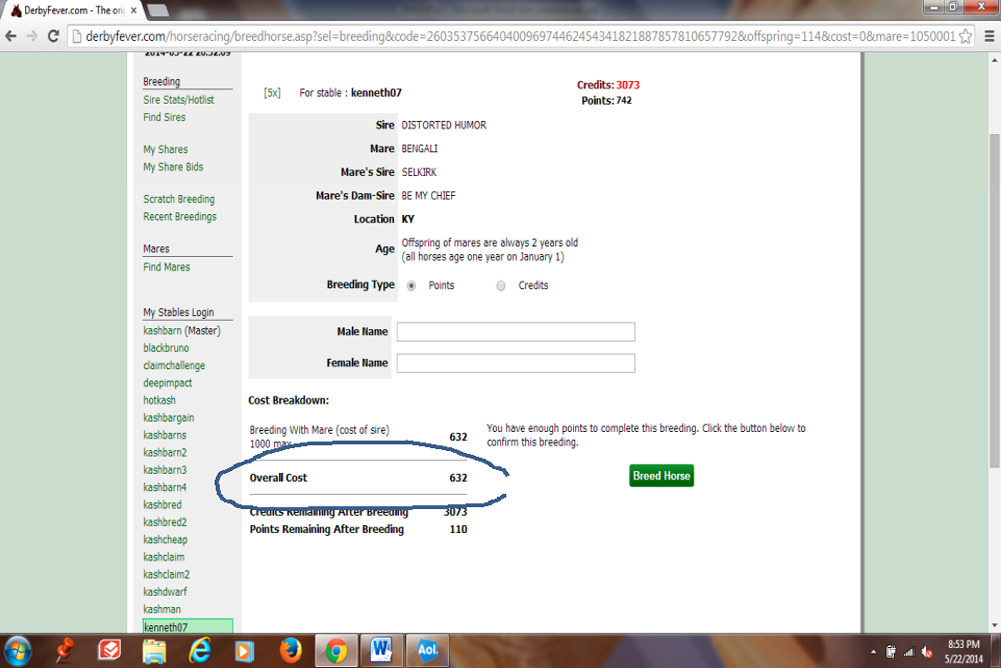
Fig.37
In this example, where the sire share has been acquired using BPs, changing the payment option (at "Breeding Type") from 'Points' to 'Credits' changes the numerical cost of using the mare as shown below [fig.38].
The 'Cost Breakdown' shows that the base cost of using the mare remains at 632. However, an additional 'Using mare and credits with point bought sire' levy of 2 times the base cost (in this case an extra 1264 credits) is also made–making a total credit cost to use the mare of 1896.

Fig.38
Once decided on the method of paying for the breeding process (points or credits) and having inserted valid male and female names, after clicking on "Breed Horse" (this button will appear after checking 'Confirm' if using credits), a popup screen appears confirming that the breeding has been successful, and the newly bred horse will soon appear in the stable listing.
Non-player-owned mares are retired mares that were either never owned by any player (always CPU owned), or where all previous owners are no longer active. The 'Find Mares' menu will list such mares – consult Appendix B section for details of eligibility.
There is an additional cost for the right to use a non-player-owned mare, as well as the cost of breeding with the mare.
Illustration breedings using a non-player-owned mare both with a Credit Sire Share and with a Breeding Point Sire Share are shown in the following sections:
USING A NON-PLAYER-OWNED MARE with a CREDIT SIRE SHARE
Before breeding to a mare, a sire share must be acquired. The earlier sections Acquiring Shares and Scratch Breeding provide details on this aspect.
The first step is to select the desired sire. Using the 'My Shares' screen, a listing of all available acquired shares will appear. Admire Moon has been chosen as the sire to breed with and the sire share was acquired for 160 credits ([fig.39].

Fig.39
On the 'Find Mares' menu, the "Status" options have been set to 'All Mares' and 'Right Now' which provides the screen shown below [fig.40].

Fig.40
Note that the 'Use' column contains a value, which is the current additional cost to use the mare. In this example, Surpassingly Race will be used to breed with at a current additional cost of 262. Clicking on the 262 in the 'Use' column selects the mare for breeding and brings up the breeding screen [fig.41].

Fig.41
After entering the desired male and female names, the 'Cost Breakdown' shows the total cost to breed the horse. In this illustration, there is a additional cost of 262 for the right to use the non-player-owned mare, plus the cost of breeding with the mare (which equals the cost of the sire – 160 in this case), making a total cost of 422.
After clicking on "Breed Horse" (this button will appear after checking 'Confirm' if using credits), a popup screen appears confirming that the breeding has been successful, and the newly bred horse will soon appear in the stable listing.
USING A NON-PLAYER-OWNED MARE with a BREEDING POINT SIRE SHARE
When using a non-player-owned mare, there is an additional cost incurred compared to the previous player-owned mare example. To illustrate this, Frankel has initially been selected as the player's choice of sire from the 'My Shares' menu [fig.42]. This share was obtained at a cost of 763 breeding points.

Fig.42
On the Find Mares menu, the options have been set to 'All Mares' and 'Right Now', which provides the screen shown below [fig.43]. Note that the 'Use' column carries a value which is the current cost to use the mare. In this example, Haunted Seattle will be used to breed with at a current cost of 262.

Fig.43
Clicking on the 262 selects the mare for breeding with, and brings up the breeding screen, where the male and female names can be entered [fig.44]. The 'Cost Breakdown' shows the total cost to breed the horse. There is the 'Mare Additional Cost' of 262 for using the 'non-player-owned' mare, plus the cost of breeding with the mare (which equals the acquisition cost of the sire) of 763 – a total cost of 1025 using BPs.

Fig.44
In this example, the player has the option of completing the breeding using credits instead of BPs. Selecting the 'Credits' payment option (at "Breeding Type") changes the cost of using the mare as shown below [fig.45].
The 'Cost Breakdown' shows that this increases the cost by an additional 'Using mare and credits with point bought sire' levy of 2 times the base cost (in this case an extra 1526 credits, making an overall cost of 2551.

Fig.45
After clicking on "Breed Horse" (this button will appear after checking 'Confirm' if using credits), a popup screen appears confirming that the breeding has been successful, and the newly bred horse will soon appear in the stable listing.
Male horses aged 4 years and over that are retired can be used as a one-time mare, known as a 'he-mare', and are available to the player retiring the horse for a 3-month period only. The cost for this is based on the horse's best racing performance; the better the winning performance, the lower the cost:
200 – Stakes or Graded Stakes win
400 – Allowance win
600 – Win at any other level
1000 – Non-winner
The process in breeding with a he-mare is similar to breeding with a mare. The first step is to select the sire share to be used with the he-mare. To illustrate the process, the sire Dansili will be used, which was acquired for 1000 credits. This was selected from the 'My Shares' menu [fig.46].
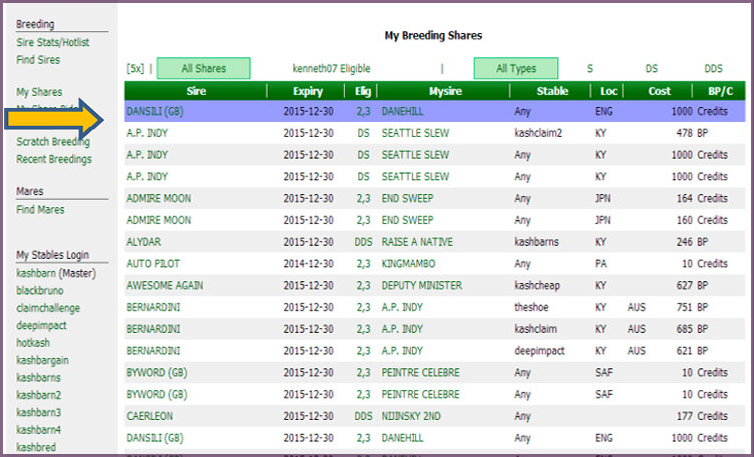
Fig.46
I See Stars will be used as the he-mare, selected from the 'Find Mares' menu [fig.47]. Note that instead of showing as 'Mine' in the 'Use' column, it shows as '400 (Male)', which indicates the cost of the horse based on his highest level lifetime win, which was at Allowance level.

Fig.47
The breeding screen appears after selection of the he-mare, and either points or credits or can be used to pay for his use [fig.48]. The cost is the same regardless of payment type.

Fig.48
In this case, credits are being used. Having inserted valid male and female names and after clicking on "Breed Horse" (this button will appear after checking 'Confirm' if using credits), a popup screen appears confirming that the breeding has been successful, and the newly bred horse will soon appear in the stable listing [fig.49].

Fig.49
In this case, the stable has the maximum of 10 active runners, so the newly bred horse has been placed into the farm. The horse can be transferred to another stable that has a free stall, or can be activated later in its current stable when there is room.
If you find yourself swamped by mares appearing in your 'Find Mares' listing that you would never want to use for breeding, it is possible to set particular mares so that they don't appear there.
This is achieved by [see fig.50]:
Clicking on the icon a third time will restore the mare to its listed state but, once de-listed, its record sheet will only be available via the main Sim menu Misc > Horse Search.

Fig.50